All Tools

Seven tools. One bundle.

Every utility in Deezy is built to solve a specific problem cleanly, without bloat. Here's what each one does and how it works.

Flagship Tool

VoiceClean

AI push-to-talk dictation that cleans up your speech before it hits the page. Runs entirely on your Mac — no cloud, no subscription, no latency from a server somewhere.

  • Hold your hotkey, speak naturally, release. Cleaned text pastes wherever your cursor is.
  • Powered by OpenAI Whisper (running locally via mlx-whisper) for transcription.
  • Ollama + llama3.2 handles grammar cleanup, filler word removal, and punctuation.
  • Three cleanup levels: Light (punctuation only), Medium (fillers + grammar), Heavy (full rewrite).
  • Works with your existing microphone — including professional audio interfaces.
  • Supports any hotkey: F13–F19, double-tap modifier keys, or custom recorded shortcuts.
  • Sits in your menu bar. Nothing on screen until you need it.
New Message — Composing
Um, so basically I just wanted to, you know, reach out and uh... let you know that the project is, like, totally done now and we can uh schedule a call or whatever whenever works for you I guess.
I wanted to reach out and let you know the project is complete. Please let me know when you're available to schedule a call.
RequiresOllama + llama3.2 (auto-installed via Deezy Setup)
Works inAny app that accepts text input
Best onApple Silicon (M1 or later)
Intel Macs Limited compatibility. mlx-whisper requires Apple Silicon. Intel Macs may experience significantly slower transcription or fail to run the AI pipeline.
Live demo — watch the difference
Mail FileEditView
● Deezy 9:41 AM
New Message — Composing
|
⌨️ Manual typing — the painful way
HoldF15to dictate
Included

Media Downloader

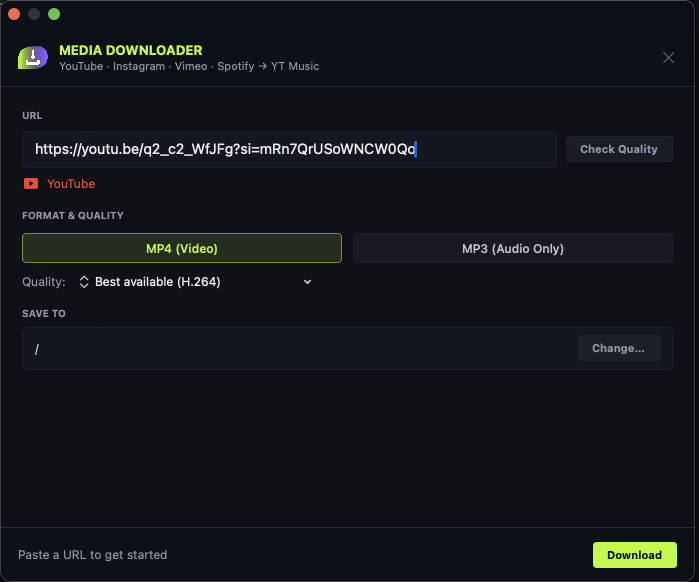
Download video and audio from URLs you have the right to access. Paste a link, pick your format, and hit Download. Intended for personal, non-commercial use only — please respect copyright and the terms of service of any platform you use.

  • Works with a wide range of video and audio hosting platforms via direct URL — use only for content you have permission to download.
  • Download as MP4 (video) or MP3 (audio only) — your choice every time.
  • Quality selector: best available, 1080p, 720p, 480p, and more.
  • Check Quality button previews available formats before downloading.
  • Detects the source site automatically and shows it in the URL field.
  • Set a default save-to folder or change it per download.
  • Powered by yt-dlp, kept current with site changes.
Intended usePersonal, non-commercial — content you have rights to access
Output formatsMP4, MP3
Requiresyt-dlp (auto-installed via Deezy Setup)
Media Downloader in use
Included

Media Converter

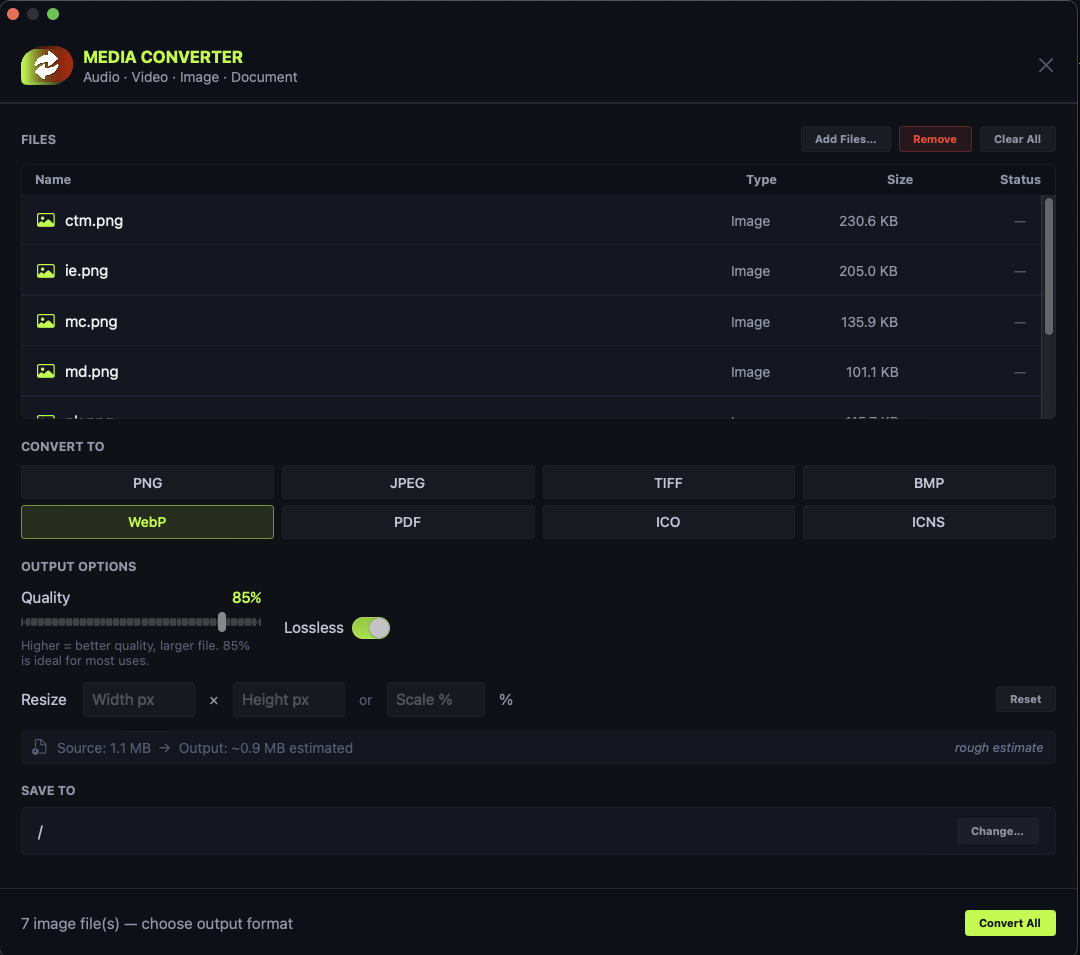
Batch convert audio, video, images, and documents in one window. Drag your files in, pick your output format, and convert everything at once. No format is too obscure.

  • Converts audio, video, images, and documents — all in the same tool.
  • Image formats: PNG, JPEG, WebP, TIFF, BMP, PDF, ICO, ICNS.
  • Drag and drop files or use the Add Files button — your pick.
  • Resize images by pixel dimensions or percentage scale during conversion.
  • Shows file name, type, size, and conversion status for every item.
  • Set a save-to folder once and forget it, or change per batch.
  • Powered by ffmpeg and Pillow — handles virtually anything you throw at it.
Audio formatsMP3, AAC, WAV, FLAC, OGG, M4A, AIFF
Video formatsMP4, MOV, MKV, AVI, WebM, GIF
Image formatsPNG, JPEG, WebP, TIFF, BMP, PDF, ICO, ICNS
Doc formatsPDF, DOCX, HTML (via pandoc, optional)
Media Converter batch conversion window
Included

Clipboard Time Machine

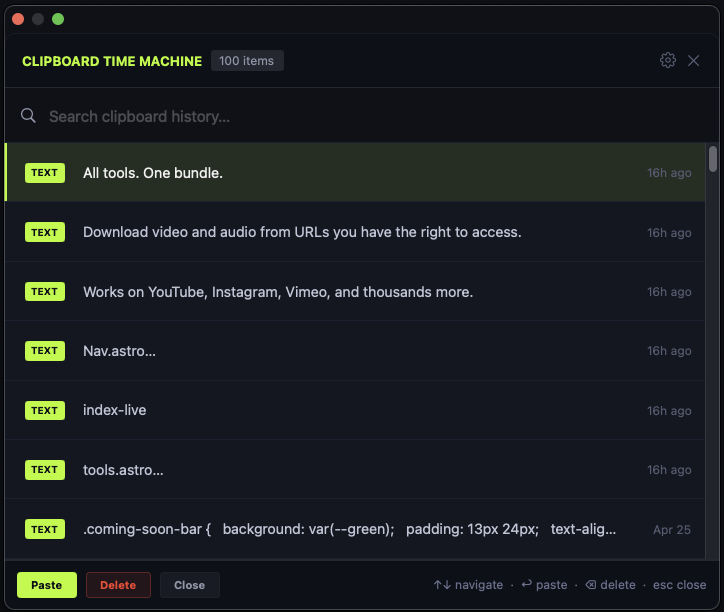
Your clipboard has always been one-item-at-a-time. Clipboard Time Machine changes that. It quietly keeps a running history of everything you copy — text, images, file paths — and makes any previous item one shortcut away.

  • Stores up to 200 recent clipboard items automatically.
  • Captures text, images, and file paths — not just plain text.
  • Trigger with a configurable hotkey: F-keys or custom double-tap shortcuts.
  • Toggle image capture and file path capture independently.
  • Option to clear history on quit for privacy-conscious users.
  • Launch at login — it's always running, always ready.
  • Lightweight and silent. Zero CPU when idle.
Max items50, 100, or 200 (user configurable)
CapturesText, images, file paths
TriggerF13–F19 or custom hotkey
Clipboard Time Machine popup
Included

Instant Edit

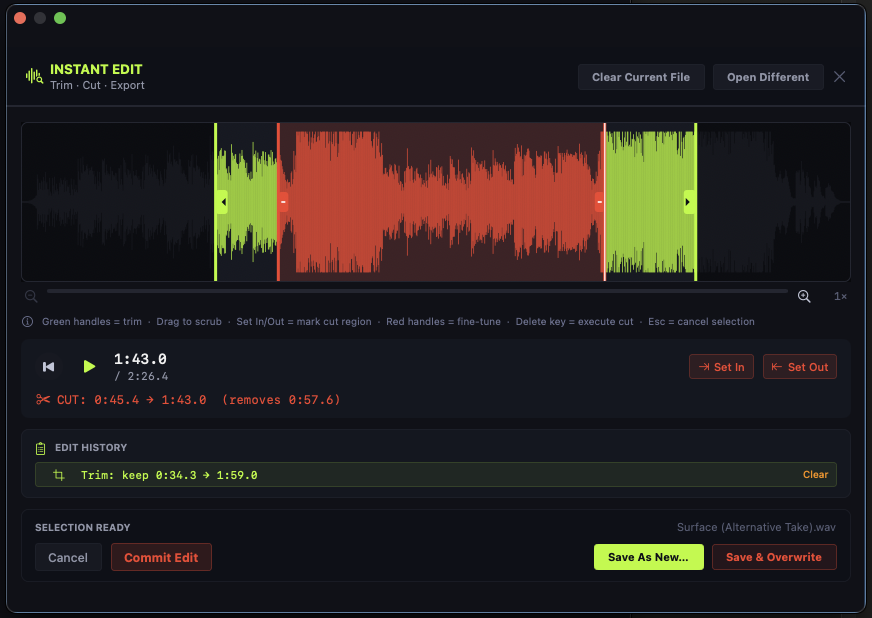
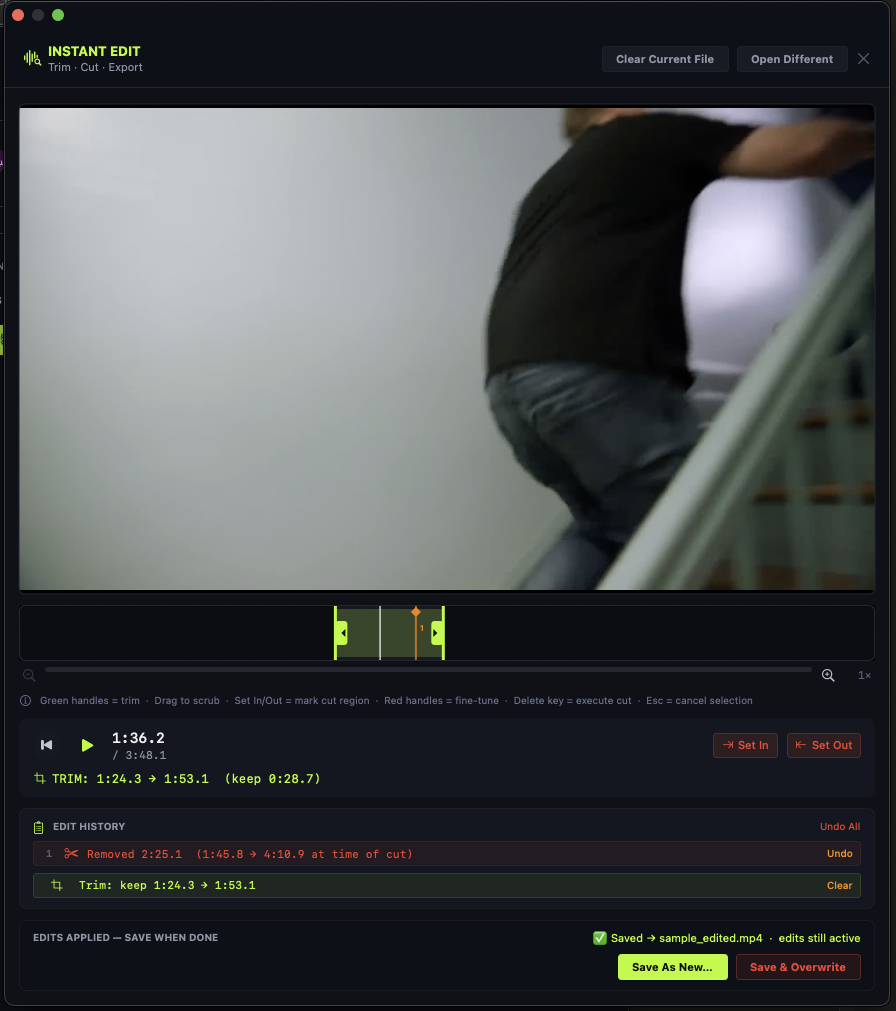
A trim-and-cut tool for audio and video that skips everything you don't need. No timeline panels, no project files, no rendering queues. Open a file, make your edit, export. That's it.

  • Works with both audio and video files — same interface, same workflow.
  • Green handles trim the edges; red handles fine-tune cut regions.
  • Set In and Out markers to remove a section from the middle of a file.
  • Full edit history — every action is tracked and individually undoable.
  • Zoom timeline for frame-accurate precision on long files.
  • Save As New to keep your original, or overwrite in place.
  • Powered by ffmpeg — fast, lossless cuts on most formats.
Audio formatsWAV, MP3, AIFF, FLAC, M4A, AAC
Video formatsMP4, MOV, MKV, AVI, WebM
Requiresffmpeg (auto-installed via Deezy Setup)
Instant Edit audio trim view
Instant Edit video trim view
Included

Pockets

Simple drag-and-drop desktop organizer. Place floating drop zones anywhere on your screen, name them, color-code them, and drag files into them throughout your day. Your desktop stays clean without you having to think about it.

  • Create named, color-coded drop zones that float on your desktop.
  • Drag any file into a Pocket to keep your workspace organized.
  • Resize each Pocket independently: 1×1, 1×2, 2×1, 2×2 grid layouts.
  • Enable or disable Pockets from the menu bar with a single toggle.
  • Trigger Pockets with a configurable hotkey — show or hide instantly.
  • Placement mode lets you position new Pockets anywhere on screen.
  • Settings accessible through Deezy Mission Control.
Layout options1×1, 1×2, 2×1, 2×2 per Pocket
TriggerF13–F19 or custom hotkey
Max PocketsUnlimited
Finder File Edit Deezy 9:41 AM
Junk 3 items
Files 7 items
Work 2 items
Screenshots 12 items
Included

SpellCheck

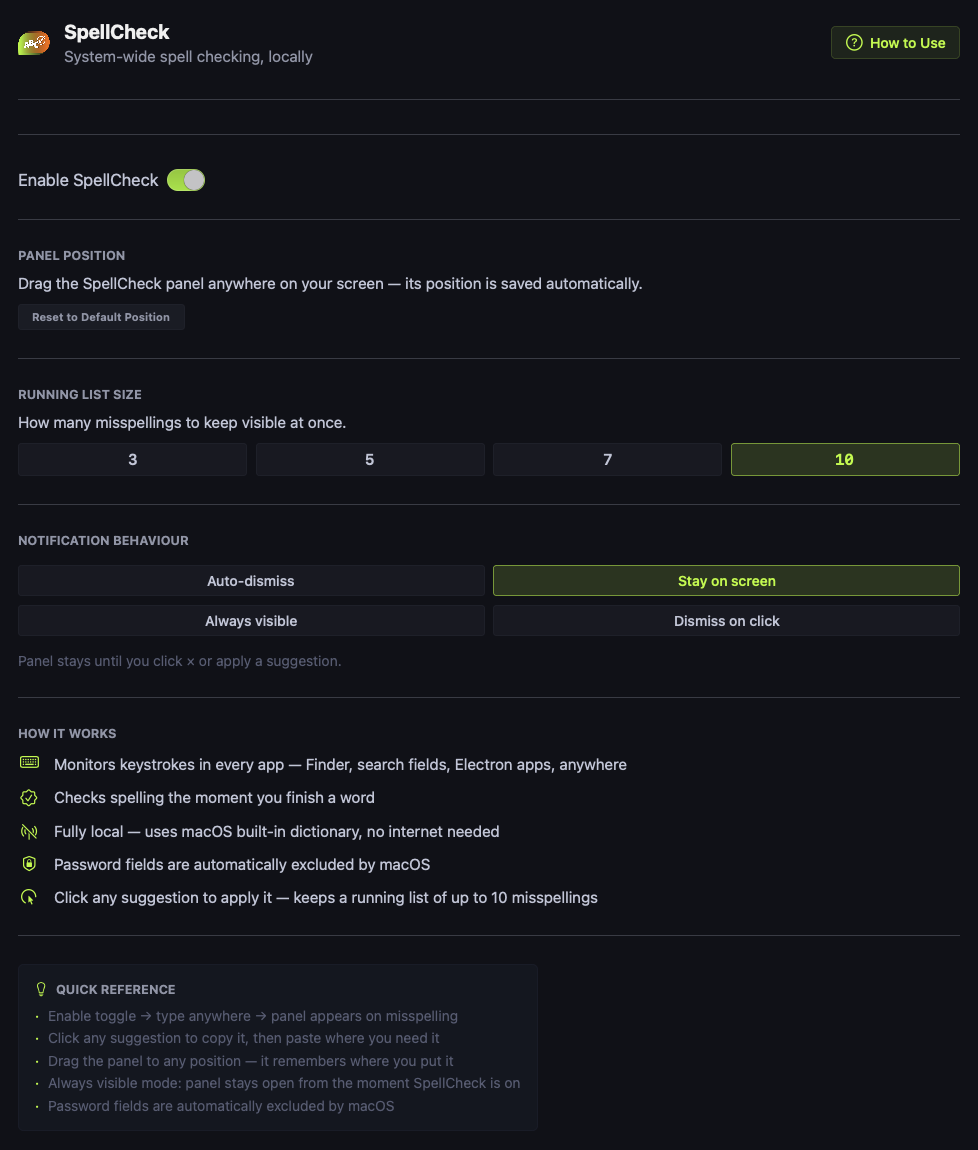
An always-on system-wide spell checker that runs locally and works seamlessly in every app on your Mac. No internet required, no account needed — it monitors your keystrokes and surfaces corrections the moment you finish a word.

  • Monitors keystrokes system-wide — works in Finder, browsers, Electron apps, everywhere.
  • Checks spelling the moment you finish typing a word.
  • Uses macOS's built-in dictionary — fully offline, no internet needed.
  • Click any suggestion to apply it — Cmd+V to paste the correction instantly.
  • Keeps a running list of up to 10 recent misspellings visible at once.
  • Password fields automatically excluded — your credentials are never monitored.
  • Drag the panel anywhere on screen. Position saves automatically.
DictionarymacOS built-in — no internet needed
Works inAll apps — Finder, browsers, Electron, native
List size3, 5, 7, or 10 visible misspellings
SpellCheck settings
Finder File Edit View Go Window Help
● Deezy Fri 9:41 AM
Macintosh HD
⋮⋮
|
Locations
💻 Macintosh HD
🌐 Network
Favorites
🏠 Home
📁 Applications
📄 Documents
⬇️ Downloads
Filenames
Name Contains ""
Content
Contains ""
SpellCheck drag to move ×
Included Free

Deezy Mission Control

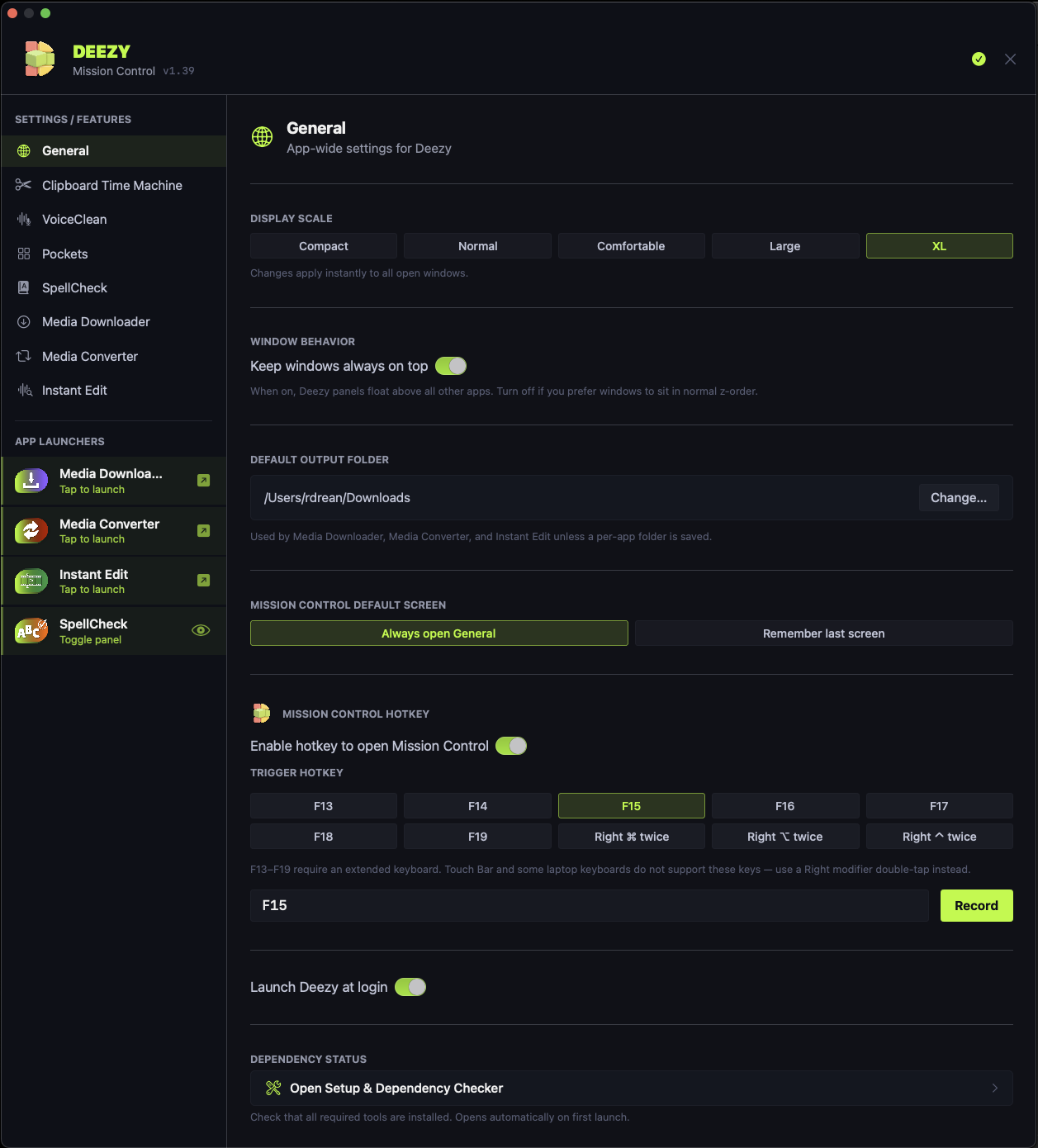
The home base for everything in Deezy. Mission Control is the central settings panel and launcher that lives in your menu bar, keeps all your tools organized, and makes sure everything is installed and ready to go.

  • Launch Media Downloader, Media Converter, and Instant Edit directly from the app launchers panel.
  • Configure global settings: display scale, window behavior, launch at login.
  • Built-in dependency checker ensures Homebrew, ffmpeg, Python, Ollama, and all required packages are installed.
  • Per-tool settings for VoiceClean, Clipboard Time Machine, Pockets, and SpellCheck accessible from the sidebar.
  • Trigger Mission Control with a configurable hotkey.
Deezy Mission Control settings

Get all seven. Coming soon.

Everything on this page, plus any new tools we ship during your update window. No subscription. Up to 3 Macs per license.

At Launch  $49.99  $30

Coming Soon

Join the waitlist  ·  Be first to know at launch